 SliTaz Lab
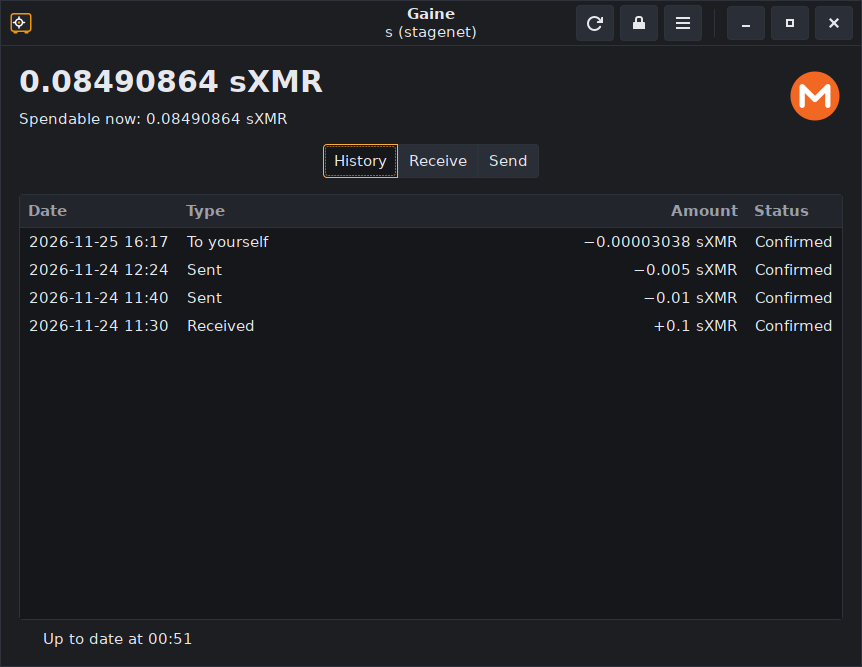
"Gaine" is French for sheath: a thin sleeve around something that matters. It is a simple wallet for people who want to receive some Monero, keep it and send it without learning a full node. Version 0.2, released on 25 November 2026, adds Bitcoin: the coin is chosen when the wallet is created, and one wallet is open at a time.
What you can do
Create a wallet
Pick a coin, a name and a password. Gaine shows the seed once, 25 words for Monero and 12 for Bitcoin: write it on paper, it is your only backup.
Receive
One address to copy and give. It can be used as often as you like.
Send
Paste an address, type an amount. The network fee is shown before anything leaves and you confirm with your password.
History
Every transfer with its date, amount and state. A double click copies the transaction ID.
Restore
Type your words to get a wallet back on a new machine. A wallet file made by another Monero program or by Electrum opens too.
Your language
English and French, from your locale. More translations are
welcome: one .po file.
First steps
- Start Gaine from the menu and choose Create a wallet.
- Write the seed words on paper, in order and keep the paper safe. Whoever reads them can take the coins. Never type them on a web site.
- Open the Receive tab and copy your address.
- Incoming coins show up within a few minutes. Monero can be spent after 10 blocks, about 20 minutes, and Bitcoin after one block, about 10 minutes: the window says how many blocks are left.
To try it without real money, run gaine --testnet. It uses
the test networks (Monero stagenet, Bitcoin testnet4), where coins are free
and worth nothing, with their own wallets and settings.
Bitcoin
Gaine is a Monero wallet first. Bitcoin is there for those who want it:
install electrum, then pick Bitcoin in Create a wallet
or Restore. Without Electrum, Gaine says what is missing and stays a
Monero wallet.
- The seed has 12 words and is an Electrum seed: it restores in Gaine and in Electrum, not in a wallet that only knows BIP39.
- The fee comes from the Electrum servers, and the confirmation shows the amount, the fee and the total before anything is signed.
- The Electrum daemon runs only while a Bitcoin wallet is open, and takes about 70 MB of RAM.
- Lightning is not supported yet.
Privacy and security
- The keys live in the wallet file, encrypted with your password. The password is asked again before coins leave or the seed is shown.
- Gaine reaches the Monero network through a remote node, by default
node.monerodevs.org. The node sees your IP address and the transactions you send, never your keys. You can change it in Settings. - For Bitcoin, the Electrum servers are picked by Electrum unless you name one in Settings. A server sees your IP address and every address of the wallet, never your keys.
- A socks proxy such as Tor (
127.0.0.1:9050) hides your IP address from the node or the servers. It is one field in Settings. - The seed is never logged. It reaches the clipboard only if you press the copy button.
Wallets live in ~/.local/share/gaine/wallets/
(Monero) and wallets-bitcoin/ next to it, settings in ~/.config/gaine/gaine.conf.
How it works
Gaine is a front end to monero-wallet-cli, the wallet of the
Monero project, which does all the cryptography. Gaine runs it for one short
task at a time (refresh, history, transfer) and gives it your password on
its standard input: never in a file, never on a command line.
For Bitcoin, Gaine starts the Electrum daemon and talks to it over a local socket in your home directory. The daemon is stopped when the wallet is locked or Gaine closes.
Get it
On SliTaz x86_64 (the Monero tools are 64-bit only):
spk-add gaine
spk-add electrum        # only for Bitcoin
gaine                   # or gaine --testnet
Anywhere else, it needs GTK 3, json-glib and
monero-wallet-cli in the path, plus electrum for
Bitcoin:
make -C src && make -C po
sudo make -C src install PREFIX=/usr
sudo make -C po install PREFIX=/usr
Sources: hg.slitaz.org/gaine · BSD license.
Gaine is young software handling real money. Start with a small amount and keep your seed on paper.